Wizardo Casino Registration
Registration gives you access to real-money games, your wallet, bonuses and personal account settings at Wizardo Casino. To create an account, you must be at least 18 years old, use valid personal details and accept the Terms & Conditions and Privacy Policy.
The first step is intentionally short. You can start with an email address and password or use one of the supported quick sign-up options, then complete the rest of your profile from the account area.
Start registration with email or quick sign-up
 The registration window asks for the information needed to open your account: email, password and country. You also need to confirm that you are over 18 and accept the applicable platform terms and privacy rules before selecting “Register”.
Register with email and password
To create an account manually, open the registration form and enter a valid email address. Create a password, confirm your country and complete the required legal confirmations.
- Open the Wizardo registration form.
- Enter your email address.
- Create your password.
- Confirm your country.
- Confirm that you are 18+ and accept the required policies.
- Click “Register” to create the account.
Use an email address that you can access at any time. It is used for password recovery, account communication and other account-related actions.
Register with Google or Microsoft accounts
You can also start registration using Google or Microsoft directly from the sign-up window. These options reduce the number of details you need to enter at the first step, while the remaining required account information can be completed in your profile afterward.
The same platform rules apply regardless of the registration method. Personal information must be accurate and the account must belong to the person using it.
Complete your Wizardo profile after sign-up
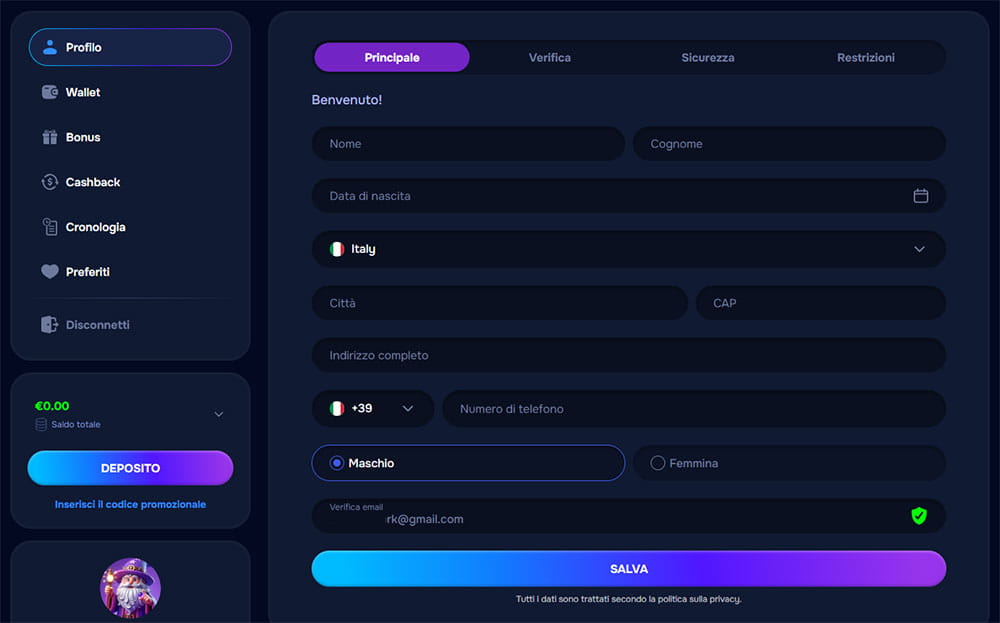 Opening the account is only the first step. The Profile area lets you complete and maintain the personal details connected to your account, which may later be used for verification and account services.
Personal details you can add in the profile
The main profile section includes the following fields:
| Profile information | Details |
|---|---|
| Personal data | First name, last name, date of birth and gender |
| Location | Country, city, postal code and full address |
| Contact details | Phone country code, phone number and email |
Enter the information exactly as it appears in your official documents. Correct profile data makes later verification and account management more straightforward.
Email confirmation and account data
Your profile also shows the verification status of the email linked to the account. A valid email is important because it can be used for password recovery, service messages, verification and communication with support.
If your contact details change, keep the information in your account up to date where the profile settings allow it.
Profile, wallet and account sections
Once registered, the personal area brings the main account functions together in one place. The menu includes Profile, Wallet, Bonus, Cashback, History and Favorites.
- Profile — manage personal details, verification, security and restrictions.
- Wallet — access deposit and withdrawal functions.
- Bonus — check promotional balances and available rewards.
- Cashback — view cashback information connected to your account.
- History — review account activity.
- Favorites — return quickly to games you have saved.
Verification and security settings
The Profile area is divided into Main, Verification, Security and Restrictions. These sections let you manage your personal information, complete checks when required and control access to your account.
Verification
Additional verification may be required for certain account actions or before a withdrawal is processed. Depending on the check, you may be asked to provide an identity document, proof of address or confirmation that the payment method belongs to you.
Provide clear and current documents when requested. Using accurate personal information from registration onward helps reduce unnecessary verification issues later.
Security
Keep your password and login details private and never share them with another person. Wizardo also offers two-factor authentication as an additional layer of protection against unauthorized account access.
If you believe someone else may know your account details, update your password and contact support if further assistance is needed.
Forgot your password?
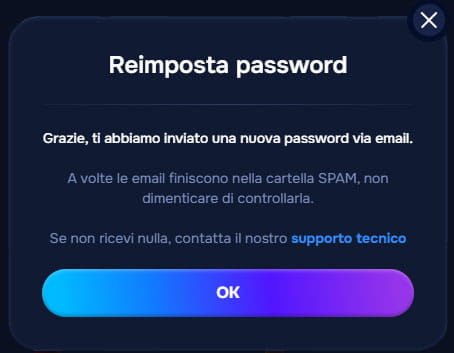 If you cannot log in because you forgot your password, use the password recovery option from the login window. A password reset message will be sent to the email address linked to your account.
Check your Spam folder if the message does not appear in your inbox. If you still do not receive the email, use the technical support link or contact the support team for help restoring access.
Account restrictions, closure and self-exclusion
Account controls are available under the Restrictions tab in your profile. From there, you can manage account closure or activate Self-Exclusion when you need to stop access to gambling services.
Closing an account blocks access and ends the use of services connected to that account. Re-registration or future restoration may be restricted according to platform rules and applicable requirements.
Self-Exclusion blocks access to the account and prevents participation in games and betting services. The restriction is designed as an account protection measure and is managed according to the rules shown in the account area.
Before you create an account
Before starting registration, make sure the information and payment details you intend to use belong to you. This helps avoid account restrictions and verification issues later.
- You must be at least 18 years old or meet the higher legal minimum age that applies to you.
- Use your own valid email address.
- Enter accurate personal information.
- Register only one account.
- Use payment methods registered in your own name.
- Make sure access to the service is permitted in your jurisdiction.
FAQ
How do I register at Wizardo Casino?
Open the registration form, enter your email and password, confirm your country and complete the required 18+ and policy confirmations. You can then click “Register” or use Google or Microsoft as an alternative sign-up method.
What information is needed to create an account?
The initial registration form requires your email address, password, country and the required legal confirmations. After sign-up, you can complete your profile with personal and contact details such as name, date of birth, address and phone number.
Can I register with Google or Microsoft?
Yes. The registration form includes both Google and Microsoft sign-up options, while additional personal information may still need to be completed in the profile afterward.
Do I need to verify my email?
The account profile includes an email verification status, so using a valid email address is important. It is also used for password recovery, account communication and support-related actions.
What should I do if I forget my password?
Use the password recovery option from the login window and follow the message sent to your registered email. If it does not arrive, check your Spam folder and contact technical support if needed.
Can I have more than one account?
No. The platform rules allow one account per player, so you should not create additional or duplicate accounts.
Can I close my account after registration?
Yes. Account closure controls are available in the Restrictions section of your profile, and closing the account blocks access and stops use of services connected to it.
Where can I activate self-exclusion?
Self-Exclusion is available from the Restrictions section in the account profile. Once activated, it blocks access to the account and gambling services according to the restrictions applied by the platform.
 EN ⌄
EN ⌄ 